// CHROME EXTENSION · MV3

Dark mode for
every website.

NightShift gives you complete control over how the web looks at night — filters, presets, a blue light overlay, reading mode, and per-site customisation.

Free · No account needed · Chrome MV3
🟢 Now available on the Chrome Web Store →
14
Features
4
Presets
0
Trackers
Free
Always
// WHAT IT DOES

Everything you need

Full control over brightness, colour, and layout — without breaking a single site.

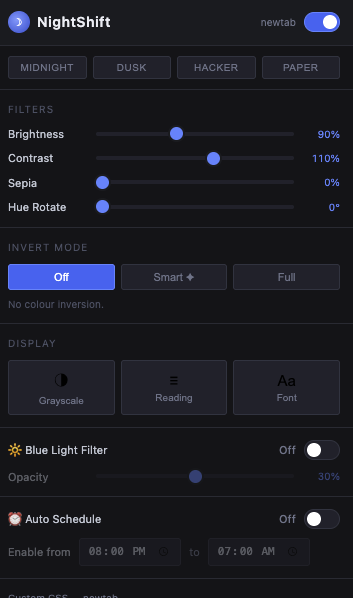
Brightness & Contrast
Fine-tune brightness (50–150%) and contrast independently on any site. Changes apply instantly.
🔄
Smart Invert
Inverts text and backgrounds for true dark mode while leaving images, videos, and canvas elements untouched.
🎨
Hue Rotation
Shift the entire colour wheel 0–360° to get exactly the tint you want, from warm amber to cool blue.
🔆
Blue Light Filter
An independent orange overlay at adjustable opacity (0–60%) reduces blue light emission for late-night reading.
Reading Mode
Strips sidebars, ads, and non-article clutter. Centres content at 740px with line-height 1.8 for comfortable reading.
Auto Schedule
Set a time range (e.g. 8pm–7am) and NightShift enables itself automatically — overnight ranges supported.
Aa
Font Override
Force any system font across all text elements. Pick from presets or type a custom font-family value.
Site Whitelist
One click to permanently exclude any site from dark mode. Great for already-dark sites like code editors.
</>
Custom CSS
Power-user textarea for injecting your own CSS per site. Applied after NightShift styles so it always wins.
// ONE-CLICK THEMES

Built-in presets

Four carefully tuned themes to get you started instantly.

N
Midnight
Deep dark, smart invert, high contrast. The classic.
D
Dusk
Warm amber tones with blue light filter on. Easy on the eyes.
H
Hacker
Green-on-black terminal aesthetic with boosted contrast.
P
Paper
Sepia-toned warm white. Like reading on aged paper.
// GET STARTED

Install in 60 seconds

1
Open the Chrome Web Store
Visit the NightShift listing on the Chrome Web Store.
2
Add to Chrome
Click the "Add to Chrome" button and confirm the permissions prompt.
3
Pin the extension
Click the puzzle piece icon in Chrome's toolbar and pin NightShift for quick access.
4
Toggle dark mode
Click the NightShift icon in your toolbar, or use the keyboard shortcut.
Alt + Shift + D
// CHANGELOG

What's changed.

v2.4.2 Latest · March 2026
FIX
Removed unused scripting permission — declared in the manifest but never called. Removed to comply with Chrome Web Store minimum-permissions policy.
v2.4.1 March 2026
NEW
Four presets — Midnight, Dusk, Hacker, and Paper. One-click configuration for the most common filter combinations.
NEW
Per-site custom CSS — write site-specific overrides that apply on top of NightShift's dark mode filters.
NEW
Blue light filter — dedicated sepia/warmth slider to reduce blue light independently of the dark mode filter.
NEW
Reading mode — strips distracting page elements and centers content for focused reading.
NEW
Scheduled activation — set a time range for NightShift to enable and disable automatically.

Full release history at brutal.net/changelog